


How to Make Your Pc System Run Faster:Increase PC Performance
 How is your computer performing?When you click a folder on your pc is it takes some time to open and frustrate you?Sometime system hangs up and its over what you are doing at that time has to be closed.So you have to type “ctrl+alt+del” button mostly?Are you one the person facing similar problem?This problem is big for the users using older generation computers or pc like dual core etc.Don’t worry this post is for you in which I am going to explain some steps which will surely boost your system performance and for a better experience,that also in simple and few clicks steps.
The speed of the computers with Microsoft Windows can be decreases after some time.This appears that system takes more time to respond to a user’s action for the operations like opening files and folders,surfing internet,running applications and softwares and much more.However, there are things you can do to speed up your computer,which I am going to explain to you.
Pc Optimization Series
This is the overview of Tasks which I am going to explain in detail.
- Delete all files from prefetch, temp & % temp%
- Make your boot faster
- Use CCleaner to Free up disk space
- Defragment Your Hard Drive
Note:I have made a brief video of some steps to just explain them better.watch that video below.
1.Delete all files from prefetch, temp & % temp%.
Whenever you surf your window as well as internet some unnecessary files are stored in your window system which are stored in a folder called temp folder.When its memory increases slow downs the windows performance hence your system performance.So it is mandatory to delete all these file in order to keep your windows system work well.
Steps to delete it are:-
- Open run window by pressing window & R button together, a small window will open.
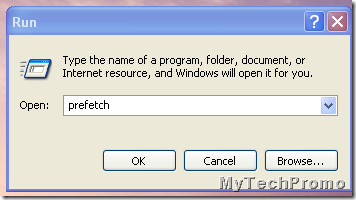
- Type in that window the word”prefetch” and click ok.
- Press shift+A to delete all files from the above folders permanently.
2. Make your boot faster
Boot system also helps you to increase your system performance and reduce you system boot time.- Type “msconfig” & press enter
- When we will hit enter the system configuration will open.

- In the screen select Startup & disabled all in that, Also go to the Boot Bar, Select No GUI Boot Instead of any other boot option & change the timeout from 30 Seconds to 3 Seconds

- After that click Apply & ok.
- After doing that restart the system & check if it boots fast or not.
3. Use CCleaner to Free up disk space
The ccleaner tool helps you to free up space on your hard disk to improve the performance of your computer. The tool identifies files that you can safely delete and then enables you to choose whether you want to delete some or all of the identified files.

Use ccleaner to:
- Remove temporary Internet files.
- Delete downloaded program files, such as Microsoft ActiveX controls and Java applets.
- Empty the Recycle Bin.
- Remove Windows temporary files, such as error reports.
- Delete optional Windows components that you don't use.
- Delete installed programs that you no longer use.
- Remove unused restore points and shadow copies from System Restore.
Get Tuorial Video Here
4. Defragment Your Hard Drive
The more information and programs you have on your computer, the more it is likely that Windows has placed parts of the same file in different locations on your hard drive. Defragmenting the hard drive places all information for each file in one place,which results in improving the system performance.The steps for defragment is different for different windows,I will share a separate post for the same.From The Author’s desk
I am sure now that you have understood all these steps completely however if you are in a trouble and facing any kind of problem regarding all the steps mentioned above then you are always most welcome to ask in comments or contact page.May be these steps are simple or well known for you I request all of you to wait for my another post for the same topic which will be advanced version and advanced steps to boost up your system speed.You can subscribe us and follow us on Facebook and twitter for fast and quick tips and tricks directly in your hand.God Bless.Keep enjoying life.SHARE THIS POST


