


How To Show The Computer Icon ON Desktop
let us know about the computer icon in recent windows versions as by default computer icon is hidden and not displayed.I am posting this tutorial on showing or place the computer back on desktop in both windows 7 and window 8.
On the start menu of the windows there is already computer icon placed.Now in windows 8 it is force the user from this tradition way.So you are not able to simply access computer icon.
you can also like to read….
here are some simple steps to show that icon back on your desktop.
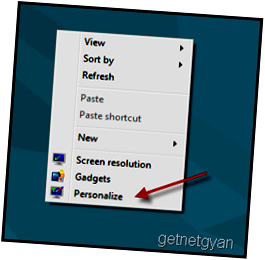
4 And the personalized window will show up,click change desktop icon from left side.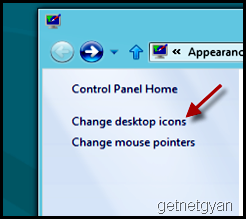
5 Now an window will pop up,click on an check the box computer next to this option.As you can see there are more option also like network etc you can select them from there if you want as is shown in the picture.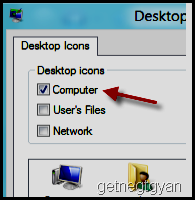
6. Click ok in in left side and close the window by saving the setting.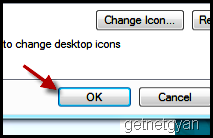
You have done it.Now you can see the Computer icon on your desktop and enjoy your fast surfing.
On the start menu of the windows there is already computer icon placed.Now in windows 8 it is force the user from this tradition way.So you are not able to simply access computer icon.
you can also like to read….
here are some simple steps to show that icon back on your desktop.
- In the latest version of window 8,if you are using in case,go to the desktop screen.If you are in start menu click desktop icon but in window 7 our can skip this step number 1.
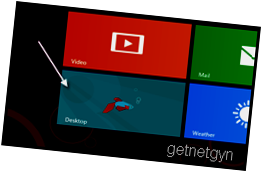
- Note –Steps are similar for both windows 7 and windows 8.
4 And the personalized window will show up,click change desktop icon from left side.
5 Now an window will pop up,click on an check the box computer next to this option.As you can see there are more option also like network etc you can select them from there if you want as is shown in the picture.
6. Click ok in in left side and close the window by saving the setting.
You have done it.Now you can see the Computer icon on your desktop and enjoy your fast surfing.
SHARE THIS POST


