


6 Way To Protect Your Facebook Account From Hacking
 If you use social networking sites such as Facebook,Twitter etc.then it is your responsibility to secure your own data.As by now we all know that posting the confidential information such as postal address,phone number and other may cause the danger.if you have not made any changes to your recovery data or setting you may lost our whole facebook account.so here are some tips how you can protect or recover your account if it has been hacked or you forget your password.
- Always enable https
In fact, you will have to temporarily disable this feature any time you give access to a new application. That alone should give you confidence that you have achieved a greater level of protection.
2
ACTIVATE TEXT MESSAGE NOTIFICATIONS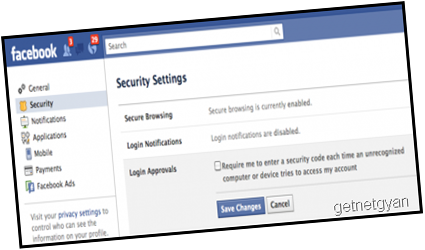
Facebook allows you to receive text notifications whenever your account is accessed from a device other than your primary computer or mobile device.
You simply go to Account Settings and then to Security Settings to set-up the proper notifications to your mobile device.
First go to login approvals – then login notifications
3
MAINTAIN YOUR PUBLIC AND PRIVATE EMAIL ADDRESSES
The email address you use for Facebook should be distinct from the one you use where security is more critical – such as your online banking or PayPal account.If your Facebook account gets hacked its embarrassing. If that is the same email used on your more secure accounts, now that vulnerability could be costly.
Obviously, if you are selective with your email addresses and periodically change your passwords, your minimize your chances of being hacked.
Did you know that anyone can search Facebook for an email address? For example, if you are looking a common name such as John Smith, you only need to search with an email to find the right one.
This is handy for finding your friends on Facebook, but also useful for hackers. The safe bet is to use distinct passwords for your public and private email addresses.
There are even more ways to protect your Facebook and other online accounts, but these 5 are the most essential. And they are specific to Facebook, which seems to be the site that is the most vulnerable.
4 >Never left your profile logged in, somebody can misuse it just for fun.
it can be more danger when you are using facebook at internet cafes do not forget to log out and never tick remember me button.
5
Don’t download any file from Facebook as it can’t be official. Facebook is a social networking site not a file sharing system.
>>Don’t delete your hacked profile it can be recovered easily however you may deactivate your profile. For a hacked account read this official help.
>>Keep your system clean from malwares, malwares can be used to read the password while logging in.
>>Enter your personal details only when it’s asked by official Facebook even if it’s an I-Mail, check for it’s sender.
6* Change your password early and often.
Yes, I usually ignore this too. But if you get alerts about somebody accessing your account who isn’t you, or see weird posts and messages on your Facebook page that you didn’t put there, odds are good somebody hacked or guessed your password. First step in the recovery process is to change your password ASAP. Follow the usual advice about using upper/lower case letters, numbers, oddball characters, etc. Yes, it’s annoying, but it’s also just as annoying to hackers, and that’s the point.
SHARE THIS POST



