


How to Always Play YouTube Videos in HD Automatically
Every internet geeker uses YouTube and spends on average 1 hr daily on YouTube.But Why to choose low quality videos like 360p or 480p quality on YouTube if your have broadband connection and can easily stream in HD? And why to settle manually your each videos to 720p each time you want to stream a YouTube in HD? Now you have no need to do so because today I am going to share the following tutorial in which I will show you How to always play YouTube videos in HD automatically.Simple steps to always play YouTube videos in HD:
- Initially you need to log in to YouTube with your account.
- If you don’t have a YouTube, just login with your Google account (Gmail).
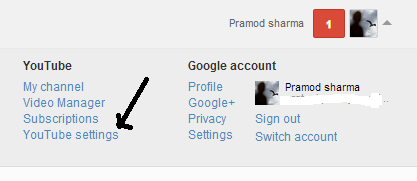
- Now click on the tab YouTube setting as shown in screenshot.
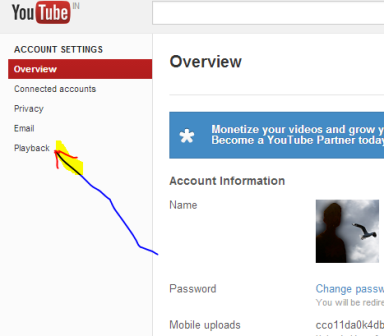
- Now click on “Playback” in the menu.
- Tick on both “Always choose the best option for me based on my player size” and “Always play HD for my connection and player or switching to full screen (when available)”.
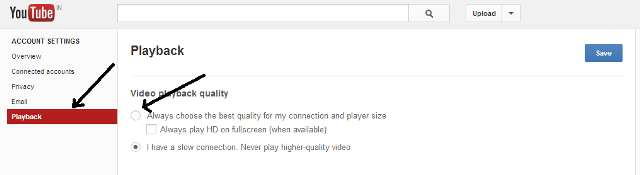
- Remember to save changes and you are done.
- The next time you full-screen a YouTube video which is available in HD, it will start playback in HD instead of that lousy 480p.
Also Read:
- How to Download YouTube Videos on Mobile Phone(All Platforms)
- Top 10 Tricks For Advanced Video Search on YouTube
That was simple but tricky one by following which you can save your time and always enjoy to play hd quality videos on YouTube.In case you are not able to implement above tutorial and facing any type of difficulty then you are free to ask me in the comments and do share with your friends on facebook and also you can like us on facebook for more such updates.
SHARE THIS POST



