


How To Disable And Enable USB Storage Device.
 In our today’s world USB drives are becoming the most popular ways to store the data and sharing and caring of data from one place to another place.The are also known as flash drives,mobile disk,pen drives etc.Nowadays usb ports are available in Pc’s and IBM compatible and apple computers.USB allows up to 127 devicesto be connected via bus port and that is asingle port.
the driver name usbstor.sys is used to communicate any USB drive to any operating system..
- USB drives are nowadays becoming most popular way of transffering any data from any computer to another computer.User logged in to your computer can easily transfer the data from your computer to another computer.He can send any viruses and Trojans affected viruses to your computer and affects your operating system.Sometime any very strong viruses can crash your computer in seconds and force you to delete and formatting our whole computer operating system.
But you can easily prevent the users to connect any USB drive in your computer by disabling the
‘usbstor.sys‘[USB drive to load the system It will only block usb storage device not your keyboard,mouse system
also see--How To Show The Computer Icon ON Desktop
- THESE ARE SOME OF FOLLOWING STEPS TO FOLLOW;
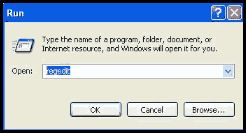
- First click on Start button to open "Run" and type "regedit" then press Ok button to open the Registry Editor.
- In registry editor locate the given path
- :
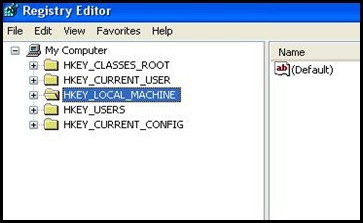 HKEY_LOCAL_MACHINE\SYSTEM\CurrentControlSet\Services\USBSTOR
 - Here select the "USBSTOR" folder and in right side of the registry editor panel find the value with name "Start".

. 5 Double click on "Start" and then set its value 4 under "Value data" section.
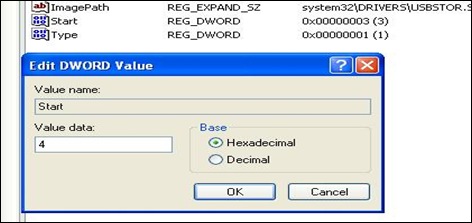
6 Close the Registry editor and restart your computer for changes to apply.
7 Now when you want to restore the default setting, open the Registry Editor and set its value back to 3.

Now again close the Registry editor and restart your computer for changes to apply.
SHARE THIS POST


